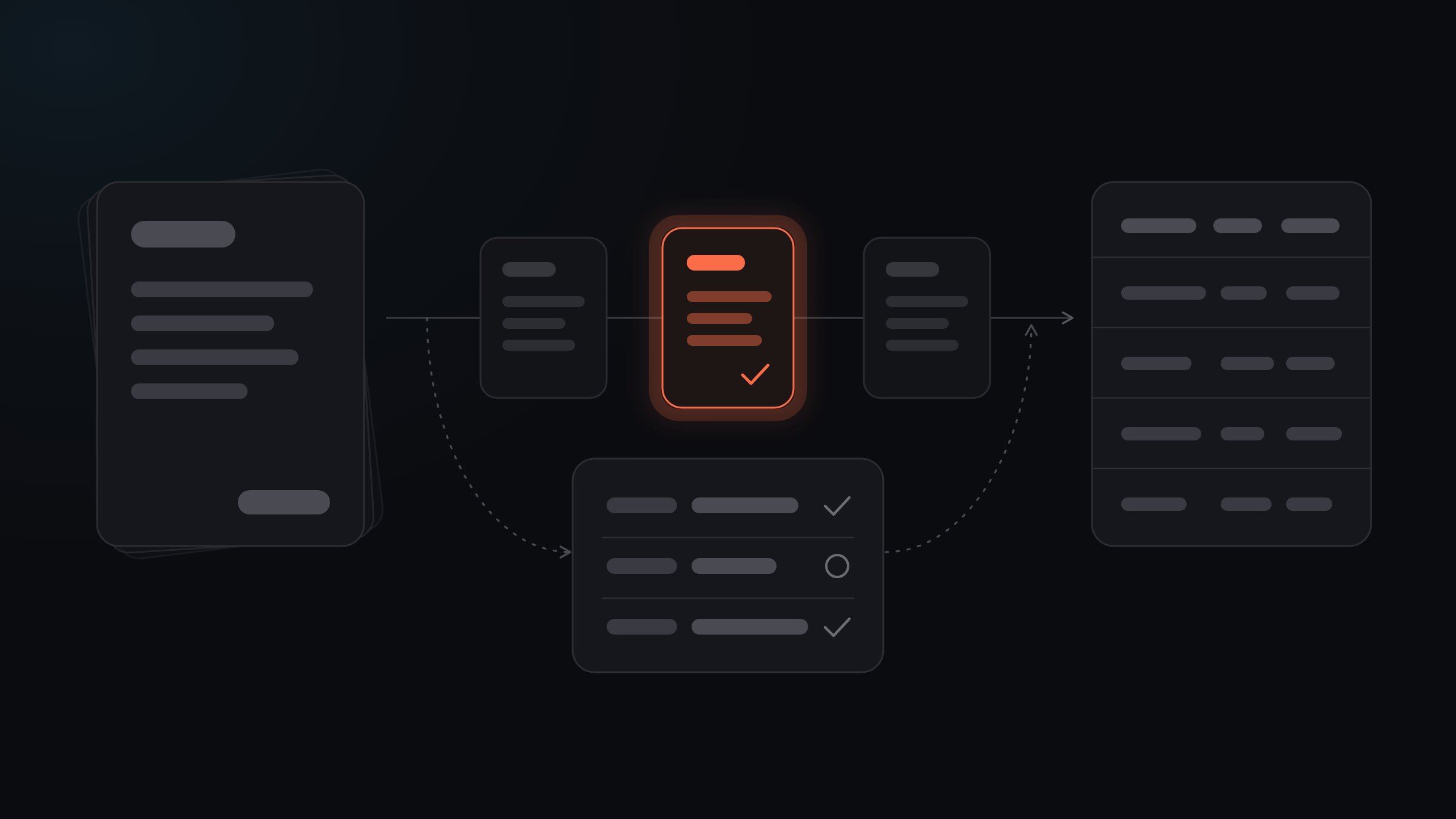
Straight-through processing (STP) means a document travels from the moment it arrives to the system where its data belongs without anyone touching it: nobody retypes it, corrects it or clicks approve. The data is read, checked and exported automatically, and only the documents the system isn't sure about go to a person. The aim isn't to push every document through untouched, but to push the right ones through and send the rest to a quick check.
Where does the term come from, and what does it mean for documents?
The phrase comes from banking. A trade or payment that moved from one system to the next without someone re-keying it in between was processed "straight through". Payments and accounts payable teams borrowed the term later, and it now covers any process that runs end to end without a manual step.
For documents, that manual step is painfully familiar. Someone opens a PDF, reads the supplier name, invoice number, total and due date, and types them into another system. Straight-through processing removes that step for every document where it isn't needed.
A document has gone straight through when all of this happened without a person:
- it arrived, by email, upload, a shared folder or an API call
- its data was extracted into fields
- those fields were checked
- the data reached its destination: your accounting software, a spreadsheet, an ERP or a webhook
One distinction matters more than the definition itself. Automated is not the same as straight through. If extraction runs automatically but someone still opens every file to approve it, you have automated capture with manual review. That beats typing by a mile, but every document still waits for a person, and your team still spends time on every single one.
What counts as a "touch"?
Be strict here, or the number you measure later means nothing. A document has been touched if anyone:
- opened it to check the extracted values
- corrected a field
- confirmed a value the system flagged as uncertain
- approved or rejected it
- re-uploaded or reprocessed it
- fixed its data after export, in the system it was sent to
The last one is the touch most teams forget. A document that sailed through extraction but needed a fix in the accounting system a week later didn't go straight through. It just moved the work somewhere harder to see.
Count touches per document, not per field. If someone corrected one field and left the rest alone, the document was touched.
How does a system decide which documents go straight through?
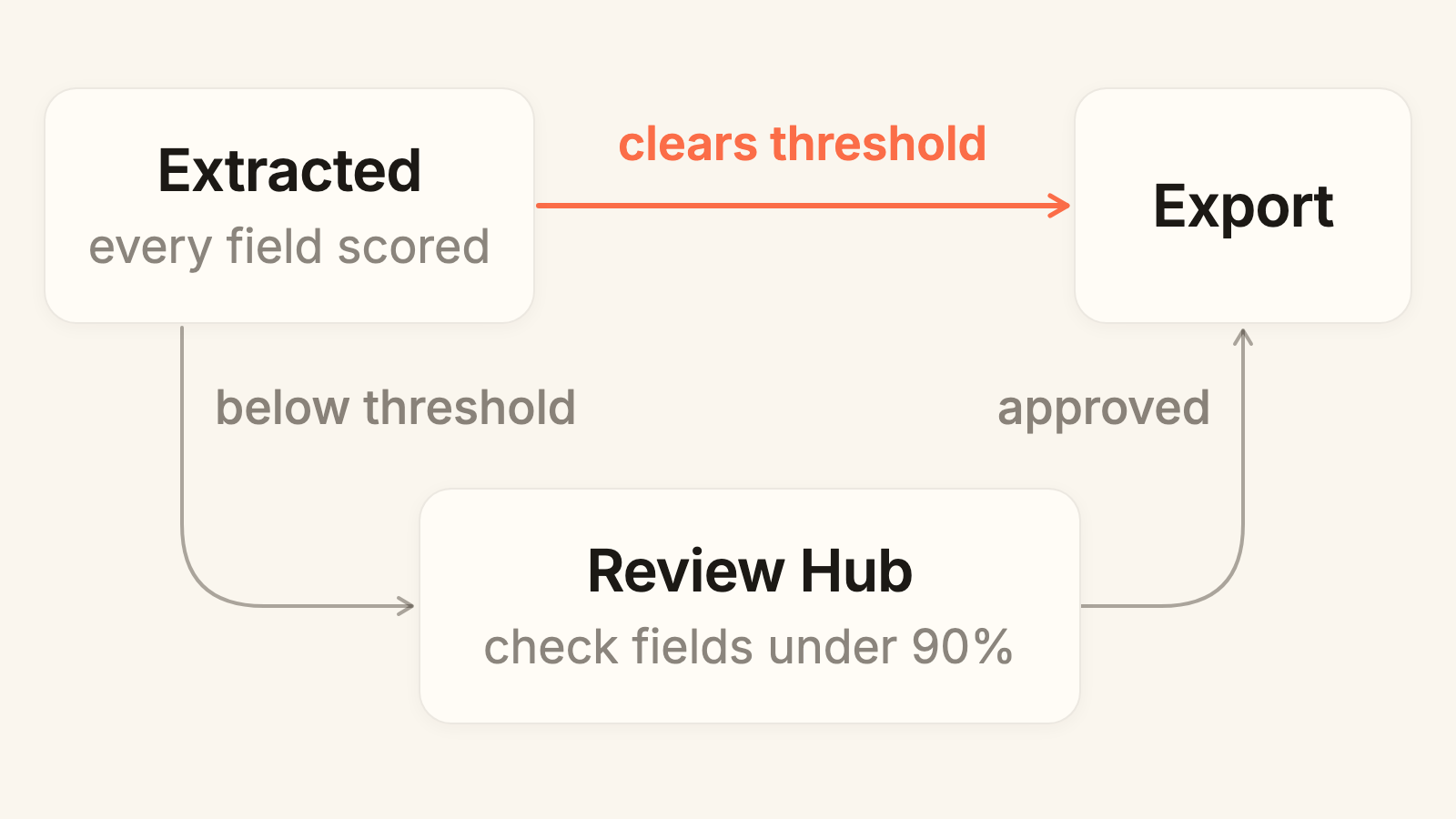
With confidence scores. Every extracted field gets one: a measure of how sure the system is that the value is right. A rule compares those scores with a threshold you set, and the document either continues to export or stops for review.
Here's how that works in Foxello. Each workflow has a review mode:
| Review mode | What happens |
|---|---|
| Automatic | Nothing stops for review. Every document goes on to export. |
| Manual | Every document waits in the Review Hub until someone on your team approves it. |
| Conditional | Documents that clear your confidence threshold go straight to export. The rest go to the Review Hub. |
Conditional is the straight-through setup, and new workflows start on it with the threshold at 90%. Two details make it safer than a single number suggests:
- Required fields. Mark a field as Required (an invoice number, say), and if it comes back empty, the document goes to the Review Hub however well everything else scored. A missing value never slips through because the fields around it looked clean.
- Field-level review. When a document does land in the Review Hub, fields at 90% confidence and above are already confirmed. Your reviewer sees the document next to the extracted values and checks only the fields marked as needing review, instead of re-reading the whole page.
Pair Conditional review with the "After Review" export trigger, and nothing that failed the check leaves the workflow before someone on your team approves it. The review and approval docs cover each setting.
Why is 100% straight-through the wrong target?
Because you could reach 100% this afternoon. Switch review to Automatic and every document goes straight through. The rate is perfect, and it tells you nothing, because nobody is checking whether the data is right.
That's the trap with STP as a headline number: it rewards removing checks, not getting data right. A few more reasons to stop short:
- Your documents aren't equal. A clean digital invoice from a supplier you've paid for years and a phone photo of a crumpled delivery note shouldn't get the same treatment.
- Some documents deserve a look whatever the score. A first invoice from a new supplier, or an amount far above normal, is a business decision, not an extraction question. Those checks belong in your approval process.
- The last stretch costs the most. Chasing the final few documents usually means lowering the threshold, and a lower threshold lets more wrong values through. A wrong total that went straight through costs far more to find and fix than the quick check that would have caught it.
We've written more about why 100% automation is usually the wrong goal and what to track instead. The short version: the target isn't "straight through". It's "straight through and right".
What can happen to a document, and which outcome should worry you?
Every document ends up in one of four places. Two went straight through, two were touched.
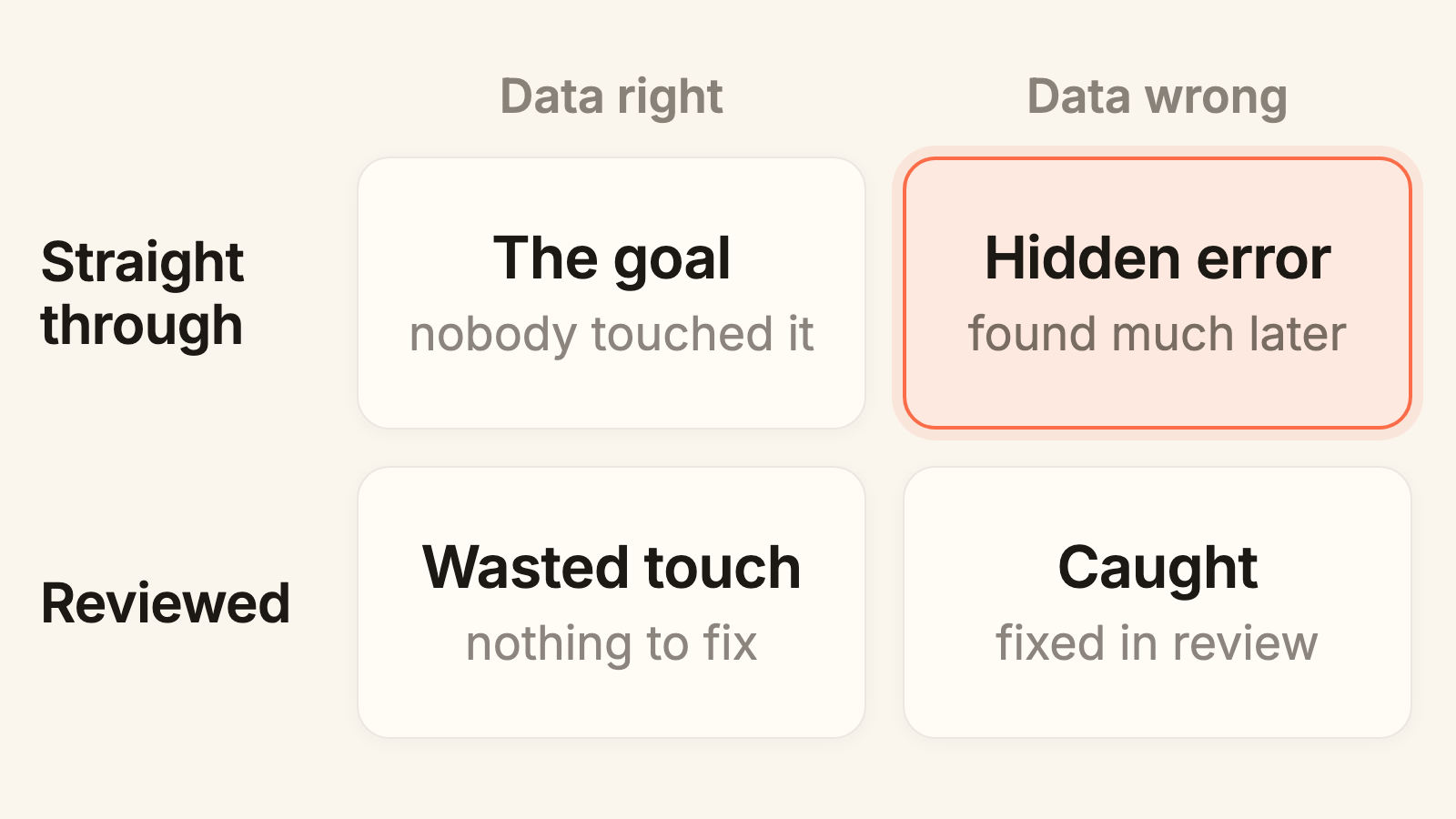
- Straight through, data right. The goal. Nobody spent a minute on it, and the data is correct.
- Straight through, data wrong. The one to worry about. It looks like success in every report until someone reconciles a statement or a supplier calls about a payment.
- Reviewed, data right. Someone opened it, checked it and changed nothing. A few of these are normal. A queue full of them means your review is stricter than your documents need.
- Reviewed, data wrong. The review caught it and fixed it. These documents are the reason you keep a review step at all.
An STP rate on its own only tells you how many documents landed in the top row. You also need to know how many of those were wrong, and how many of your review touches were wasted.
How do you measure your own straight-through rate?
You don't need a benchmark. You need your own numbers, measured the same way every time. Use this worksheet:
- Pick one document type and one period. Last month's supplier invoices, for example. Mixing types hides problems, because one messy document type drags down a clean one.
- Count every document received in that period. Call it A.
- Count the touched documents using the checklist above: reviewed, corrected, reprocessed or fixed after export. Subtract them from A. What's left is B, your straight-through documents.
- Work out your STP rate: B ÷ A.
- Spot-check the straight-through pile. Take a sample of the B documents, as many as you can check properly in one sitting, and compare every field with the original. Count the documents with at least one wrong value, then divide by your sample size. That's your straight-through error rate.
- Count wasted touches. Of the touched documents, count the ones where nobody changed anything, and divide by the number of touched documents (A − B).
- Repeat every month with the same document type and the same method, and read all three numbers together.
| Number | How to work it out | What it tells you |
|---|---|---|
| STP rate | B ÷ A | How much of the pile nobody had to touch |
| Straight-through error rate | wrong documents ÷ sample size | Whether the documents nobody touched were actually right |
| Wasted touch rate | unchanged reviews ÷ (A − B) | How much review time went on documents that were already fine |
Here's how to read them:
- STP rate rising, spot checks clean. Exactly what you want. Keep going.
- STP rate rising, spot checks finding errors. Something is letting bad data through. Raise the threshold, or move that document type back to stricter review.
- STP rate low, most reviews change nothing. Your review is stricter than it needs to be. That's a tuning problem, not an extraction problem.
- STP rate low, reviews keep finding real errors. The extraction itself is struggling with these documents. Look at which fields keep failing, and why.
How do you raise the rate without letting errors through?
Change one thing at a time and re-measure after each change. Roughly in order of payoff:
- Find the fields that keep stopping documents. If the same field lands in "needs review" on most documents, fixing that one field can send a whole batch of documents straight through.
- Sharpen field descriptions. With Instinct, you describe each field in plain language. A vague description ("the date") leaves room for the wrong value. A precise one ("the invoice issue date, not the due date or delivery date") doesn't.
- Match the mode to the document. Instant handles standard documents like invoices and receipts with predefined fields. Mastery learns from your examples and suits the same layout arriving at volume. Instinct is the quickest start for a new document type.
- Mark only truly mandatory fields as Required. Each Required field is a deliberate stop. Use them for values a document can't be valid without, not for nice-to-haves.
- Give risky documents their own workflow. Thresholds are set per workflow, so a high-value document type can run in a workflow with a stricter threshold or Manual review, while routine documents go straight through.
- Improve what comes in. Clear scans and flat, well-lit photos read more reliably than shadowy, folded ones. If one sender's documents always fail, the fix may be a conversation, not a setting.
Done well, review shrinks over time instead of staying a fixed cost. We've covered how to set up review so it gets smaller in a separate post.
What does straight-through processing look like for a small team?
For most small teams, it isn't a project. It's a setting and a habit. Documents come in through web upload, email (Growth and up), Google Drive, FTP or the API. Foxello extracts the fields and scores each one. Documents that clear your threshold go out as JSON, CSV or Excel, or to your other systems by webhook or API, depending on your plan. The rest wait in the Review Hub, where your own team checks only the fields that need it.
Foxello is delivered as a service, with nothing to install and EU hosting. Plans start at €14.99 a month, and there's a 30-day trial. Run a month of one document type through it, fill in the worksheet above, and you'll know your own rate instead of guessing at someone else's.
FAQ
Is straight-through processing the same as automation?
No. Automation means some steps run without a person. Straight-through processing means every step does, for a given document. A workflow where extraction is automatic but every file still waits for approval is automated, yet nothing in it goes straight through.
What is a good straight-through processing rate?
There's no universal number, because it depends on your documents. A good rate is the highest one where your spot checks stay clean. A high rate with errors hiding in the straight-through pile is worse than a lower rate you can trust.
Does straight-through processing mean nobody checks the data?
Nobody checks that particular document. Someone still checks the process: regular spot checks of straight-through documents tell you whether your threshold is set right. Without them, you're trusting a number you've never tested.
Which documents should never go straight through?
Ones where a wrong value is expensive, or where a person has to make a judgment call anyway, such as a first invoice from a new supplier or an unusually large amount. Run those in a workflow with Manual review or a stricter threshold, and let routine documents go straight through.
Is straight-through processing the same as touchless invoice processing?
It's the same idea under a different name. "Touchless" is the term accounts payable teams tend to use for invoices that reach the accounting system without anyone handling them. Straight-through processing covers any document or transaction that does the same.