The wrong question everyone starts with
Most teams evaluating document AI ask one question first: can it read this?
Wrong question. A modern extraction model can handle almost anything now - clean invoices, bad scans, handwritten forms. That was the hard problem five years ago. It isn't anymore.
The question that actually decides whether an automation project works is quieter: how sure is the model that what it just pulled out is correct, and what happens the second it isn't?
That number is the confidence score. It's the actual product of the whole exercise. Everything else - OCR, layout parsing, field mapping - is plumbing that feeds into it.
Most vendors bury this number in a settings tab. We think it's the whole story.
What the number is actually measuring
A confidence score isn't the model double-checking its own work. It's a calibrated guess: given everything the model has seen, how likely is this exact value to be right?
That's a probability, not a receipt. High confidence doesn't mean "verified." It means "statistically, this is very likely correct" - a more honest claim, and a different one.
It also doesn't grade the document. It grades the field. An invoice can have nine fields extracted at 99% and one line-item total sitting at 61%. That one field is enough to pull the whole document into review, even though the rest of it was flawless.
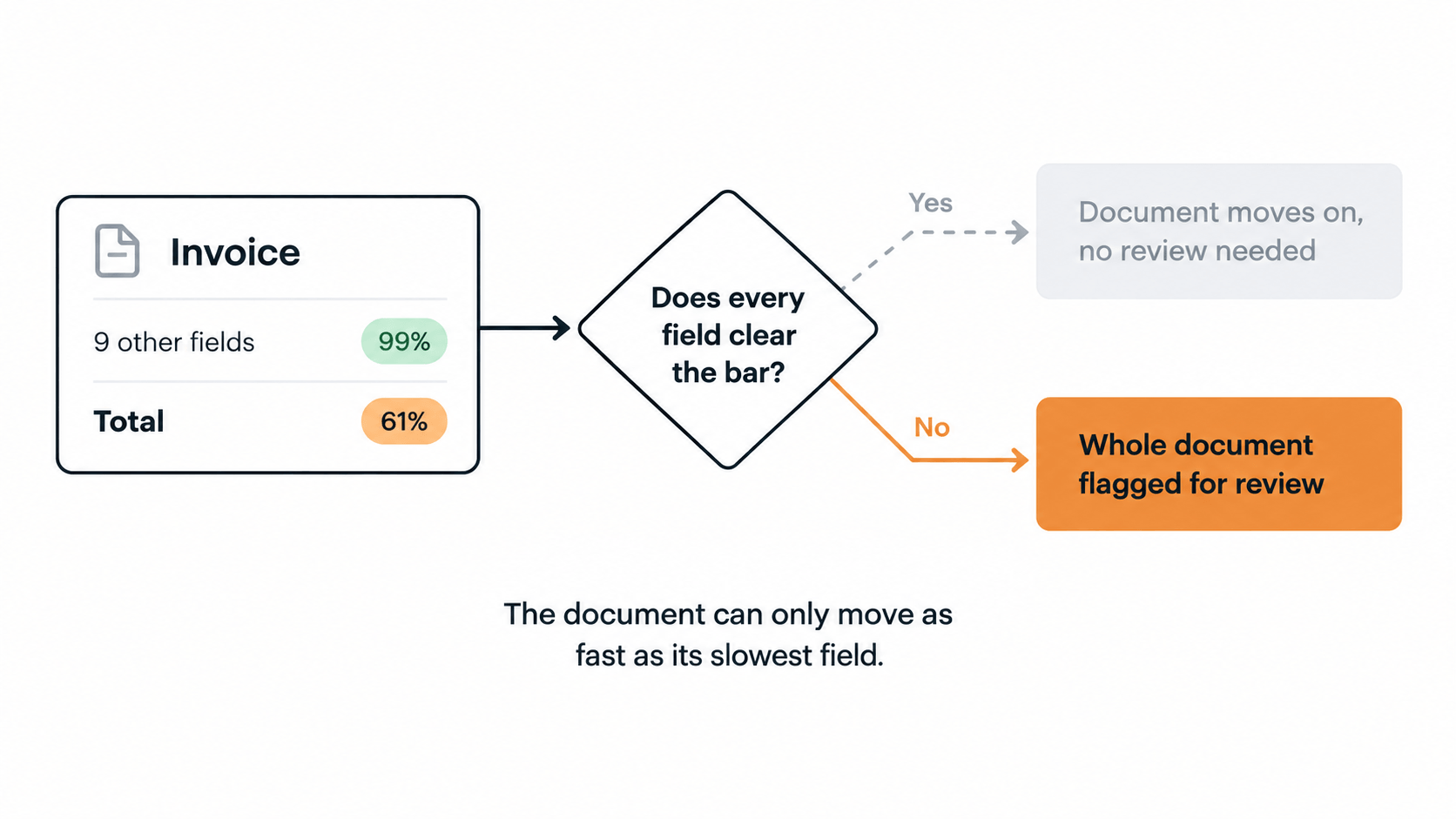
What happens next depends on how the workflow is built. Some systems let you set a separate bar for every field. The more common, simpler pattern is one bar for the whole workflow: every field on a document has to clear it, or the document goes to review.
Either design ends up in the same place. The document can only move as fast as its slowest field. A vendor name being slightly off is annoying. A wrong total is a payment problem - which is exactly why the bar usually gets set high enough to catch the second kind of mistake, even if it means reviewing a few of the first kind too.
Why 100% automation is the wrong goal
Every automation pitch eventually gets asked: can we get to 100%?
You can. Two ways. Set the confidence threshold so high that almost nothing clears it, which just moves the manual work back to where it started. Or lower the bar and let the software wave things through anyway, which doesn't remove the errors, it just removes anyone watching for them.
Neither is automation. One is theater, the other is risk with better marketing.
This is the precision/recall trade-off, without the jargon: raise the confidence bar and you catch more mistakes, but more documents land in front of a human. Lower it and fewer documents need a human, but more wrong values slide through untouched. There is no setting that gives you both for free.
The cost of a bad extraction was never the ten seconds it takes to check a field. It's the wrong total that pays a vendor twice, or the wrong quantity that ships. Automation's job is to make an unreviewed error rare and cheap to catch, not to make review disappear.
Even the best-run teams don't hit 100% on purpose. Ardent Partners' benchmarking research found that top-performing accounts payable teams straight-through-process around 65% of their invoices - and that's the high end, not a shortfall.
The right goal: shrink the queue, don't eliminate the human
The metric worth tracking isn't "zero review." It's whether the review queue gets smaller over time, and why.
Every document a workflow clears cleanly is evidence. Once a team sees how rarely a given document type's fields fall below the bar, month after month, they can raise that workflow's threshold themselves - deliberately, on a track record, not on hope. The queue shrinks because someone made an informed call with real data in front of them, not because the software quietly decided it knew better.
That's the real difference between a document AI tool that automates and one that just processes. The first gives you the evidence to make that call with confidence. The second reads everything on day one and gives you no reason to ever touch the settings again.