If you've searched "intelligent document processing," you've probably landed on a page that defines it as "the convergence of OCR, NLP, and machine learning to enable straight-through processing of unstructured data." Accurate. Also useless if you run a six-person bookkeeping firm and just want the invoices out of your inbox and into a spreadsheet.
Here's the plain version.
IDP in plain words
IDP in one sentence
Intelligent document processing is software that reads a document the way a trained clerk would, pulls out the specific pieces of information you care about, and hands them back as clean, structured data.
That's it. An invoice goes in. Vendor name, invoice number, date, line items, and total come out, in rows and columns, ready for your accounting tool.
What "intelligent" is actually doing in that name
The word has one job: separating this from plain OCR. OCR turns a picture of text into text. It can tell you the page says "€4,820.00". It has no idea whether that's the total, the VAT, or a number in the footer.
IDP knows. It reads for meaning, not position, so it finds the total on an invoice it has never seen, from a supplier whose layout looks nothing like the last one.
That sounds like a small difference. For a team handling 40 supplier formats, it's the difference between a tool that works and a tool that needs babysitting.
Why the term sounds like it's for someone else
Because, mostly, it has been. Grand View Research estimates large enterprises accounted for 71.6% of IDP revenue in 2025. The category grew up selling to banks and insurers with procurement departments, implementation partners, and six-month rollouts. The vocabulary followed.
Even analysts can't agree how big the thing is. 2025 estimates range from about $3 billion (Grand View Research) to $10.4 billion (Fortune Business Insights), depending on what they count. When the people paid to measure a category can't agree on its edges, a small team is allowed to be confused about what they're buying.
The same Grand View report names small and mid-sized businesses as the fastest-growing segment. The technology got cheap enough, and easy enough to set up, that the label now covers tools a three-person team can start using in an afternoon.
What this guide covers
- How IDP differs from OCR and template-based tools
- What happens to a single document, step by step
- What it means in hours and euros for a small team, including when you don't need it
- What to check before you pay for anything
OCR vs. templates vs. IDP: what actually changed
Document software went through three generations. Each one fixed the previous one's main annoyance.
Generation 1: Plain OCR reads letters, not meaning
OCR has been around for decades. You give it a scan; it gives you a block of text. Someone still has to read that text, find the invoice total, and type it into the right box. It saves retyping a whole page. It doesn't save the hunting.
There's also a catch in how OCR accuracy gets quoted. Vendors report character accuracy, and 99% sounds excellent. But take a page with 1,500 characters on it: 99% means around 15 of them are wrong. If one of those 15 sits in the total, the 99% doesn't help you much.
What a small team actually needs to know is field accuracy: did the total, the date, and the VAT number come out right?
Generation 2: Templates tell the software where to look
Template tools (often called zonal OCR) solved the "where is the total?" problem by making you draw boxes. The invoice number lives in this rectangle, top right. The total lives in that one, bottom right. For one stable layout, this works well.
It breaks the moment the layout changes. A supplier redesigns their invoice. Someone sends a phone photo taken at an angle. A new client arrives with 12 vendors you've never seen. Every one of those means building or fixing a template, and sooner or later one person on the team becomes the "template person." When they go on holiday, the documents pile up.
To be fair to templates: if you process one format that never changes, at high volume, they're cheap and reliable. You don't need anything fancier.
Generation 3: IDP reads for meaning
IDP drops the boxes. You describe what you want, like "invoice total including VAT" or "consignee name," and the software finds it wherever it sits on the page. A supplier it has never seen is just another document, not a setup project.
It also does something the earlier generations didn't: it tells you how sure it is, field by field. A clean printed total might come back 98% certain. A smudged handwritten date might come back 60%. That score is what makes automation safe, because you can let the confident fields through and check only the shaky ones.
It isn't magic. Bad scans are still bad scans. The difference is that the software flags the problem instead of quietly getting it wrong.
Side by side
| Plain OCR | Template tools | IDP | |
|---|---|---|---|
| What you get | A block of raw text | Specific fields, from known layouts | Specific fields, from any layout |
| Setup for a new format | None, but you do the extraction by hand | Build a template per layout | Describe the fields once |
| Supplier changes their layout | No change; it's still manual | Template breaks and needs fixing | Usually handled without changes |
| Phone photos, scans, handwriting | Hit or miss | Often fails if alignment shifts | Handled, with lower confidence flagged |
| Tells you when it's unsure | No | Rarely | Yes, per field |
| Who maintains it | Whoever retypes the data | Your "template person" | Mostly no one |
| Best fit | Making archives searchable | One stable format at high volume | Many formats, changing suppliers, small teams |
So what actually changed?
The software didn't get dramatically better at recognizing letters. What changed is where the setup work lives: it moved from configuration (boxes, rules, templates) to a plain-language description.
For a small team, setup was always the deal-breaker, not accuracy. A tool that needs a technical person every time a supplier changes their PDF won't survive a busy month. That's the gap IDP closes, and it's the approach Foxello is built on: you name the fields you want in plain words, and there are no templates to build or maintain.
What happens to one document, step by step
Definitions only go so far. Let's follow one ordinary, slightly annoying document all the way through: a supplier invoice, photographed on someone's phone, slightly crooked, emailed to your accounts inbox at 4:55 on a Friday.
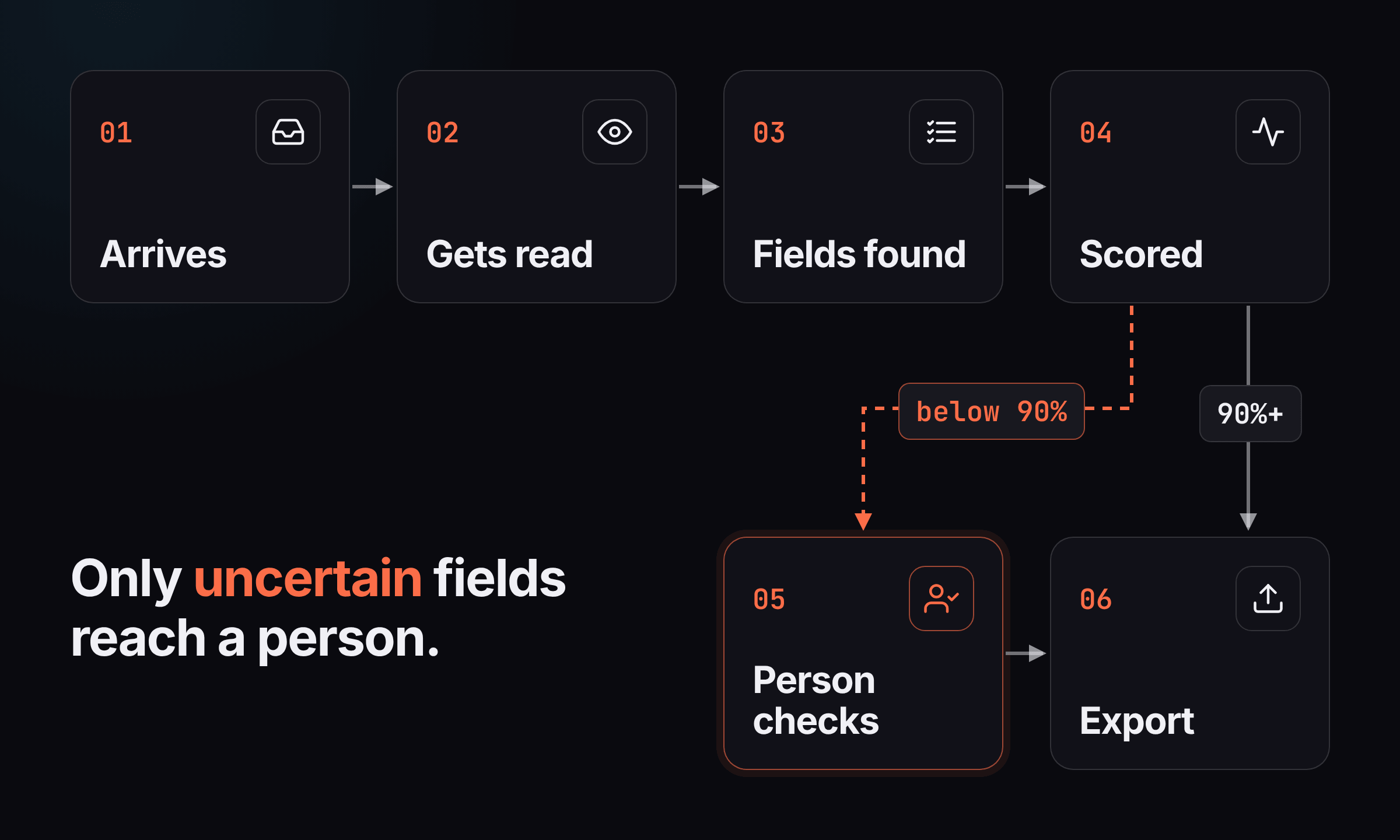
Step 1: The document arrives
Nobody has to stand at a scanner. The invoice comes in through whatever channel already exists: a dedicated email address, a shared Google Drive folder, an FTP server, a manual upload, or an API call from another system.
This matters more than it sounds. If getting documents in takes effort, people batch them "for later," and later becomes month-end.
Step 2: It gets cleaned up and read
The software straightens the crooked photo, sharpens faint text, and recognizes the characters on the page. This is the OCR layer from the previous section. It's still there, just no longer the whole job.
On a typical page this and the next step take seconds. Foxello averages about 24 seconds per page in our own testing.
Step 3: The fields you asked for get found
This is the "intelligent" part. You told the system once what you want, in plain words: "supplier name," "invoice number," "total including VAT," "due date." It finds each one by what it means, not where it sits.
Line items come out as a table, one row per product or service, rather than a blob of text. If the supplier redesigns their invoice next month, nothing breaks.
Step 4: Every field gets a confidence score
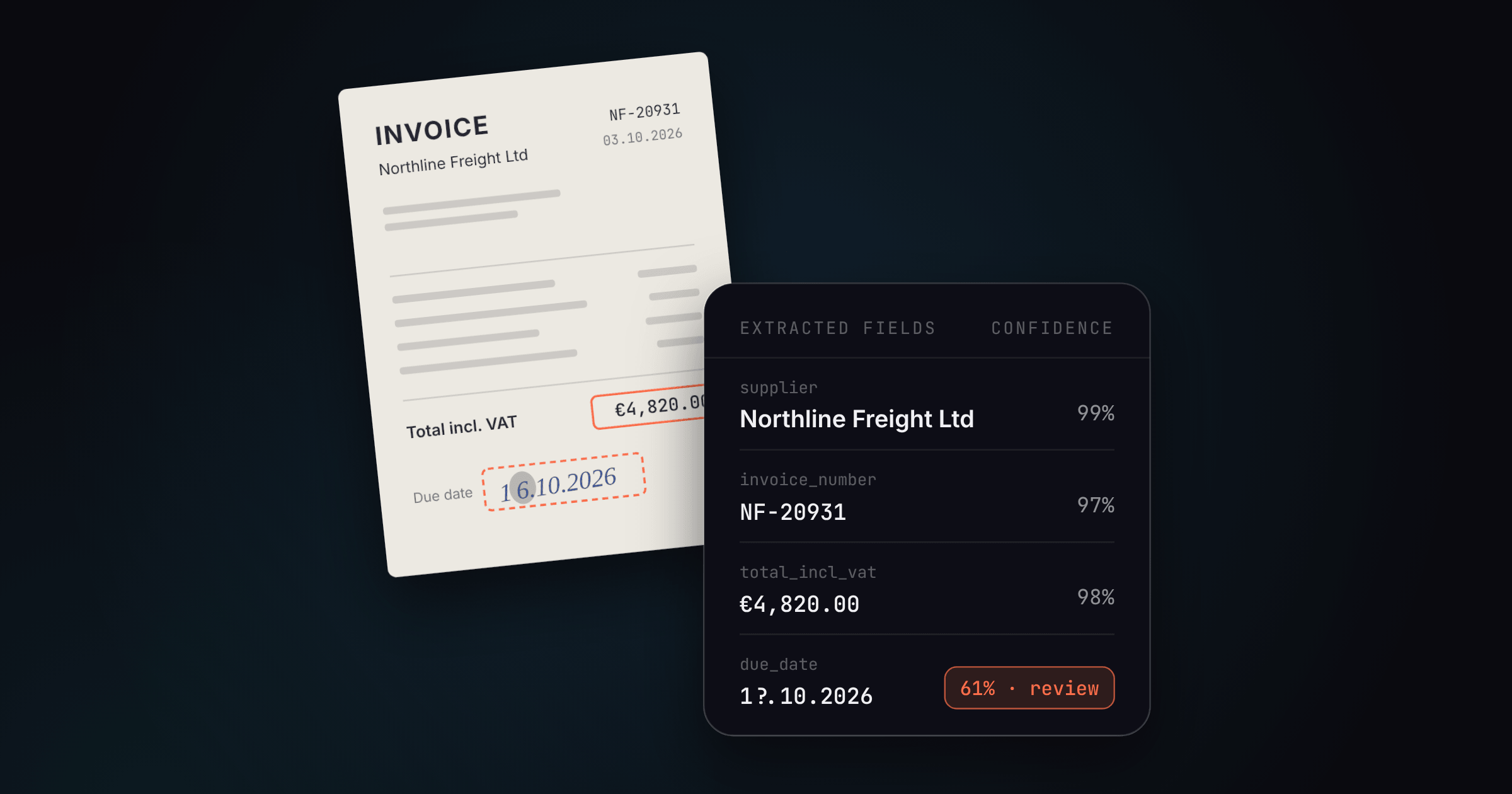
Each extracted value comes back with a number saying how sure the system is. Here's what that might look like for our Friday invoice (illustrative values):
| Field | Extracted value | Confidence | What happens next |
|---|---|---|---|
| Supplier | Northline Freight Ltd | 99% | Confirmed automatically |
| Invoice number | NF-20931 | 97% | Confirmed automatically |
| Invoice date | 03.10.2026 | 95% | Confirmed automatically |
| Total incl. VAT | €4,820.00 | 98% | Confirmed automatically |
| Due date | 1?.10.2026 (smudged) | 61% | Sent to a person |
| PO reference | (blank) | 0% | Sent to a person |
This is the step that makes automation safe. Without it, you'd have to check everything. With it, you check the two lines that deserve a second look.
In Foxello, any field at 90% confidence or above is confirmed automatically, and anything below waits for a human. Fields you mark as required count as 0% if they come back empty, so a missing PO number can't slip through quietly.
Step 5: A person checks the exceptions, not the document
The reviewer sees the invoice image next to the extracted fields, with the uncertain ones flagged. They read the smudged date, type the PO number, approve, and move to the next one. Thirty seconds of human attention instead of five minutes of retyping.
What this step means depends on who you are:
- For a small finance or ops team, the goal is to keep this queue as close to empty as possible. Review is a safety net.
- For a BPO or shared-services team, this queue is the operation. What matters is how many documents one reviewer can clear per hour, which is why keyboard shortcuts and "approve and open the next one" matter more than any demo feature.
Step 6: The data goes where it's needed
The finished record goes out as JSON, CSV, or Excel, lands in a shared Google Drive folder or on an FTP server, or gets pushed through a webhook or the API into your accounting tool, ERP, or your own system. No proprietary format, nothing to retype at the other end.
Where it can still go wrong
A confidence score catches "I can't read this." It doesn't always catch "I read it perfectly and it's the wrong number," like a PO number pulled from a quoted reference line instead of the header. It's rare on well-described fields, but it happens.
Our advice: for the first few weeks, spot-check a sample of auto-confirmed documents, not only the flagged ones. Once the misses are boring and rare, stop. That's when you've earned the right to trust it with your Friday 4:55 invoices.
What it means for a small team: hours, euros, and when you don't need it
Most IDP content stops at "saves time and money." That's not much help when you're deciding whether to spend €40 a month and an afternoon on setup. So let's put numbers on it.
What the benchmarks say, and who they describe
Ardent Partners' State of ePayables 2025 surveyed 204 AP professionals. Headline numbers:
| Metric | Average | Best-in-Class | Everyone else |
|---|---|---|---|
| Cost to process one invoice (all-inclusive) | $9.84 | $2.65 | $12.42 |
| Time to process one invoice | 8.2 days | 2.9 days | 13.5 days |
| Invoices processed straight-through | 35.4% | 51.0% | 29.0% |
| Invoice exception rate | 18.4% | 11.1% | 20.9% |
Look at who answered before you anchor on these: 54% of respondents work at companies with more than $1 billion in revenue. These are teams with AP software, dedicated staff, and budgets, and they still process only about a third of invoices without a human touching them.
A five-person logistics firm or a small bookkeeping practice is usually closer to the "everyone else" column, if not further back.
What IDP fixes and what it doesn't
That 18.4% exception rate deserves an honest footnote. Many AP exceptions aren't reading problems. They're business problems: a price that doesn't match the PO, a missing approval, a duplicate invoice.
IDP removes the typing and makes those problems visible sooner, because the data is clean and structured the moment the document lands. It doesn't settle the argument with your supplier about the price. Anyone promising that is selling something else.
A worked example: 400 invoices a month
Benchmarks are someone else's numbers. Here's a calculation you can redo with yours. Every input below is an assumption. Swap in your own.
| Input | Manual | With IDP |
|---|---|---|
| Documents per month | 400 single-page invoices | 400 single-page invoices |
| Hands-on time per document | 4 min (open, read, type, check) | 0 min for clean documents |
| Documents with a flagged field | n/a | 1 in 4 = 100 |
| Time per flagged document | n/a | 30 seconds |
| Spot-checking (first weeks) | n/a | 1 hour/month |
| Total hands-on time | ~26.7 hours/month | ~1.8 hours/month |
| Labor cost at €25/hour | ~€667/month | ~€46/month |
| Software cost | €0 | €39.99/month |
| Monthly total | ~€667 | ~€86 |
That's roughly 25 hours a month back (about three working days) for the price of a team lunch.
Two things this table doesn't capture are usually worth more than the hours:
- Speed. Data is in your system the same day, not whenever someone gets to the pile. That's what makes early-payment discounts and on-time supplier payments realistic.
- Resilience. When the one person who "does the invoices" is sick or leaves, the work doesn't stop.
(The €39.99 is Foxello's Growth plan, which covers 570 pages a month at standard extraction depth. A self-serve tool in this range is the realistic comparison for a team this size, not an enterprise contract.)
A quick formula for your own numbers
Hours saved per month ≈ (documents × minutes per document ÷ 60) − (flagged documents × 0.5 ÷ 60)
If the result is under a few hours a month, read the next part carefully.
When you don't need IDP
Not every team does. Skip it, or wait, if:
- Your volume is tiny. If you handle a few dozen documents a month and one person clears them in an hour, the setup isn't worth it yet. Come back when volume grows.
- You process one format that never changes, at high volume. A template tool is cheaper and perfectly reliable for that. Use it.
- Your documents already arrive as data. Structured e-invoices (for example via Peppol) don't need to be "read." Belgium has required structured B2B e-invoices since 1 January 2026, Germany has required businesses to be able to receive them since January 2025 (with issuing phasing in from 2027), and the EU's ViDA rules make structured e-invoices mandatory for intra-EU B2B trade by July 2030. If most of your inbound invoices are already structured, your problem is integration, not extraction.
- You need judgment, not data. Contract review, legal analysis, or approval routing are different jobs. IDP pulls data out; it doesn't decide whether a clause is acceptable.
Even with e-invoicing spreading, plenty will stay on paper and PDF for years: bills of lading, delivery notes, claims forms, handwritten forms, receipts, and invoices from small and non-EU suppliers. That's where IDP keeps earning its keep.
When you clearly do need it
The triggers we see most:
- Volume grew, and the answer on the table is "hire someone to do data entry"
- An expensive mistake traced back to a typo
- The person who "handled the documents" left, and nobody else knows how
- Someone spends hours every month fixing templates in an existing tool
- Month-end close keeps slipping because data entry is behind
If two or more of those sound familiar, the math above probably works in your favor.
What to check before you pay for anything
Every vendor demo looks great, because every vendor demos on documents they picked. Your job is to find out how the tool handles yours: the crooked phone photo, the supplier who still faxes, the form someone filled in with a blue biro on a moving truck.
Here's how to run that test in an afternoon.
Step 1: Build a "worst documents" test pack
Pull 20 to 30 real documents from the last month. Don't pick clean ones. Include:
- Your three or four most common suppliers or formats
- At least two formats you've never processed before
- A phone photo, a low-quality scan, and anything handwritten
- One multi-page document with line items
If a tool can't handle this pack in a free trial, it won't handle your real Monday morning.
Step 2: Score fields, not impressions
Character accuracy is the wrong number. Track whether each field came out right. A plain spreadsheet does the job:
| Document | Fields correct | Fields wrong | Fields flagged as unsure | Wrong and not flagged |
|---|---|---|---|---|
| Supplier A invoice (PDF) | 11 | 0 | 0 | 0 |
| Supplier B invoice (photo) | 9 | 2 | 2 | 0 |
| Handwritten delivery note | 6 | 2 | 1 | 1 |
The last column is the one that matters most. A tool that's sometimes wrong but tells you so is safe. A tool that's confidently wrong is the one that costs you money.
Step 3: Time the setup
Start a timer when you begin setting up your first document type. Stop it when the first correct result comes out. Then do it again for a second, different format.
If the second format takes as long as the first, you're looking at a template tool with a new coat of paint. Real setup for a new format should be minutes, not a support ticket.
The questions to ask
| Question | Why it matters | Good answer | Red flag |
|---|---|---|---|
| Is pricing published? | You shouldn't need a call to know if you can afford it | A public price page, in your currency | "Contact sales" for a five-person team |
| What counts as a page, and what costs extra? | Per-page pricing hides surprises | Clear rules for harder documents and overages | You find out at the first invoice |
| Does it score confidence per field? | It's the only way to review exceptions instead of everything | Yes, with an auto-confirm threshold you can see | One score per document, or none |
| How do I get my data out? | Lock-in is a cost you pay later | JSON, CSV, Excel, API, webhooks | Proprietary format or a paid "connector" |
| Where is my data stored, and is it used for training? | GDPR and client trust | Named region, plus a clear "never used for training" | Vague answers or "to improve our models" |
| Can I try it without a card or a call? | Shows whether the vendor trusts the product | Free start, cancel any time | Mandatory demo before trial |
| What happens when a supplier changes their layout? | That's the problem you're paying to solve | "Nothing, it reads by meaning" | "Our team will update the template" |
Accuracy claims: read the small print
When a vendor says "99% accuracy," ask three things. 99% of what: characters, fields, or documents? Measured on which documents? Before or after human review? An honest vendor answers all three without blinking. A number with no definition behind it is marketing, not a benchmark.
How Foxello approaches it
Here's how Foxello answers those same questions, trade-offs included:
- Pricing: Published, in euros. Starter €14.99, Growth €39.99, and Scale €99.99 per month. Every plan includes all three extraction modes and the Review Hub.
- What a page costs: One token processes one page. Harder documents processed in Deep mode use two tokens per page, and we say so up front.
- Setup: No templates. Describe fields in plain words (Instinct), give one example to lock in a consistent format (Mastery), or pick a ready-made model for common documents like invoices, IDs, and US tax forms (Instant). A new workflow takes about a minute to create in our own testing.
- Confidence: Every field gets a score. Fields at 90% or above confirm automatically. Everything else goes to review, and required fields that come back empty get flagged, never skipped.
- Review: A keyboard-driven queue that opens the next document the moment you approve one, with one workflow per client or document type. Small teams barely see it. BPO teams live in it.
- Getting data out: JSON and CSV on every plan. Excel, REST API, webhooks, email import, Google Drive, and FTP from Growth up.
- Data: Processed and stored in the EU, encrypted in transit and at rest, never used for training.
- Trying it: Free start, no card, on your own documents. Cancel any time, no contracts.
And where we're not the right fit, we'd rather you know now. If you need on-prem deployment, a named ERP connector instead of API or webhooks, or contract and legal review, look elsewhere. Same if you process one unchanging format at massive volume, where a template tool is probably cheaper.
Run your worst-documents pack through it. Score it with the sheet above. Same as anything else. That's the whole pitch.
FAQ
Is intelligent document processing the same as OCR?
No. OCR is one ingredient. It turns a picture of text into text. IDP uses OCR, then works out what that text means: which number is the total, which date is the due date, which name is the supplier. Then it hands you those as structured fields. If OCR gives you a transcript, IDP gives you a filled-in spreadsheet row.
Is "AI document processing" the same thing as IDP?
For practical purposes, yes. "AI document processing," "intelligent document processing," and "document AI" all describe software that reads documents and extracts data without templates. Which label you see depends mostly on the vendor's marketing team. What matters is what the tool does with your documents, not what it calls itself.
Do I have to train it on my documents?
Not with modern tools. You describe the fields you want in plain language, or pick a ready-made model for common documents like invoices or IDs. Some tools, Foxello included, also let you give one example document to keep the output format consistent. That's one example, not a training project.
Is it accurate enough for finance work?
On clean printed documents, it's usually very accurate. On smudged scans and handwriting, less so. That's why per-field confidence scores matter more than any headline accuracy figure. The tool should confirm what it's sure of and send the rest to a person. Test it on your own worst documents before trusting any vendor's percentage.
Can it read handwriting?
Yes, within limits. Neat handwriting on forms usually comes through well. A rushed scrawl gets a lower confidence score and goes to review. Treat handwriting as "mostly automated, sometimes checked," not "fully hands-off."
How much does document processing software cost?
It ranges from enterprise contracts sold through procurement down to self-serve plans you can pay for with a card. For a small team, look for a published price, clear rules on what counts as a page, and no overage surprises. Foxello starts at €14.99 a month, and you can try it on 100 pages free with no card.
Is it GDPR-safe?
It can be. Ask where documents are stored, whether they're encrypted, whether they're ever used to train AI models, and whether the vendor signs a data processing agreement. Foxello processes and stores data in the EU, encrypts it in transit and at rest, and never uses customer documents for training.
Will it replace the person who does our data entry?
It replaces the typing, not the person. In a small team, that person usually has better things to do: chasing suppliers, fixing mismatches, closing the month on time. In a BPO, the same reviewers handle far more documents because they validate flagged fields instead of retyping whole pages.
How long does it take to get started?
If the tool is right for you, an afternoon. That's enough to build your worst-documents test pack, set up a workflow, and score the results. If a vendor's onboarding is measured in weeks, it was built for a different kind of company.
The short version
Intelligent document processing is a long name for a simple idea: software that reads your documents so your team doesn't have to retype them.
For years that idea came wrapped in enterprise contracts, implementation projects, and templates that broke whenever a supplier changed their logo. That's changed. Reading by meaning removed the setup tax, confidence scores made it safe to automate, and self-serve pricing put it within reach of a five-person team before lunch.
Not every team needs it. If you handle a few dozen documents a month, or one format that never changes, keep doing what works. But if invoices, delivery notes, or claim forms are eating hours every week, run your worst 20 documents through a free trial and score the results. The numbers will tell you.
Stop paying people to type. Start free - no card
Sources
- Grand View Research, Intelligent Document Processing Market Report, 2026-2033
- Fortune Business Insights, Intelligent Document Processing Market Size, 2026-2034
- Ardent Partners, The State of ePayables 2025
- Fonoa, Peppol Adoption in Europe: What's Coming in 2026 and the Road Ahead
Foxello figures (~24s per page, ~1 min to create a workflow) are from internal testing. Worked-example inputs are stated assumptions, not measured data.