It's Monday morning. Forty supplier invoices came in over the weekend, and your extraction tool has already turned them into neat rows of data. Vendor, date, total, PO number. Every field filled in.
That last part should worry you.
The invoice that had no PO number
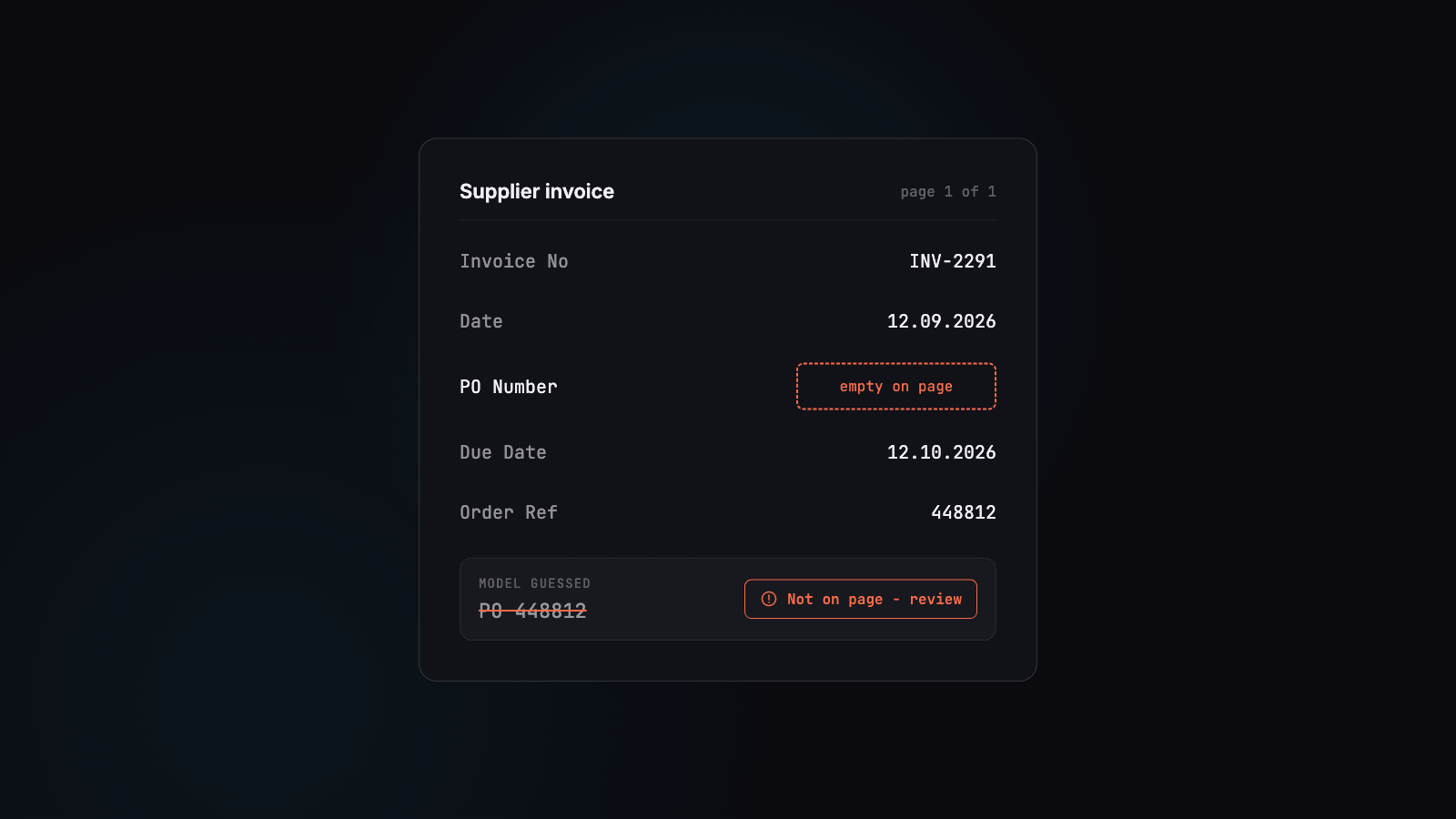
Invoice number 27 is from a small packaging supplier. They never put PO numbers on their invoices. They have an order reference in the top corner and a customer number in the footer, but no PO.
The tool returned a PO number anyway. It took the order reference, which looked like a PO, sat roughly where a PO usually sits, and had the right number of digits. Nothing flagged it, and the row looked as clean as the other 39.
Blank gets a question. Wrong gets paid.
This is the uncomfortable truth about AI document processing in finance. An empty field is annoying, but it's honest. Someone sees the gap, asks the supplier, and fixes it.
A wrong value that looks right doesn't trigger anything. It flows into your accounting system, gets matched, approved and posted. You find out weeks later during a reconciliation, a supplier dispute or an audit. By then, nobody remembers invoice number 27.
The problem isn't that AI makes mistakes. People make mistakes too. The problem is the kind of mistake: confident, plausible and silent.
Why this happens, and what to do about it
Most of this comes down to one design choice made before the AI ever reads your document. Many tools turn the page into a long stream of plain text first. The layout that would tell the model "this box is empty" gets thrown away, so the model fills the gap with its best guess.
In this post, we'll cover four things:
- why flattening a page into plain text leads to guessing
- why asking the model nicely not to guess doesn't fix it
- what that costs when the data is accounting data
- how to test any tool for this before you trust it with your invoices
We'll also show how we handle it at Foxello: in a review workflow, a value we can't find on the page gets flagged for a person to check instead of being exported quietly.
What happens when a page becomes plain text
An invoice is a visual document. The supplier's designer put the invoice number top right, the bill-to address on the left and the totals in a box at the bottom. That arrangement carries meaning: a value belongs to the label next to it, above it, or in the same box.
Most AI extraction pipelines throw that arrangement away in the first step.
The shortcut most tools take
Language models read text, not pages. The easiest way to get a document into a model is to run OCR, collect every word, and send it as one long string. That approach is cheap, fast and easy to build, which is why it's everywhere.
It works fine on clean, single-column documents. Real invoices are not single-column documents.
What a flattened invoice looks like
Here's the top of a fairly ordinary invoice, the way a person sees it:
Invoice No:  INV-2291          Bill To:   Kovac Logistics
Date:        12.09.2026        Ship To:   Same as billing
PO Number:                     Order Ref: 448812
Due Date:    12.10.2026
And here's roughly what the model receives once the page has been flattened into reading order:
Invoice No: Bill To: INV-2291 Kovac Logistics Date: Ship To:
12.09.2026 Same as billing PO Number: Order Ref: 448812
Due Date: 12.10.2026
Look at "PO Number:". In the original, it sits above an empty space. In the flattened version, the next number it touches is 448812, the order reference.
The model never saw an empty box. It saw a label followed closely by a number.
Three things that get lost
- Which label owns which value. Two columns get merged into one line, so labels and values from different sides of the page end up next to each other. A value can easily end up attached to its neighbour's label.
- Empty fields. A blank box has no text, so it leaves no trace in the text stream. Plain text has no way to say "this field exists and is empty."
- Table structure. Rows and columns collapse into strings of words. Quantities drift under the wrong headers, and line items that continue onto page two lose their column names.
Why this matters more than OCR quality
It's tempting to blame bad scans. Sometimes that's fair. But a perfect OCR read of the example above still produces the same confusing string. Every character is correct, and the structure is still gone.
That's the point people miss. Many extraction errors aren't reading errors. The model reasons perfectly well over a broken picture of the page. Give it the wrong picture, and its correct reasoning leads to a confident wrong answer.
That leads to the next question: why does the model fill the gap at all, instead of saying "not found"?
Why the model fills the gap
Ask a person to find the PO number on an invoice that has none, and they'll say "there isn't one." Ask a language model the same question, and you'll often get a number.
That isn't laziness or a bug. It comes from what these models are built to do.
Built to answer, not to abstain
A language model is trained to produce the most likely continuation of what it's given. When the instruction is "return the PO number," the most likely continuation is a PO number. Saying "nothing here" is possible, but it's always swimming against the current.
The extraction schema adds more pressure. A list of fields to fill reads like a form, and forms are meant to be completed. Every empty slot is a small nudge toward putting something in it.
The model also has candidates nearby. Invoices are full of numbers and dates that look alike:
- an order reference where the PO number should be
- the invoice date used again as the due date
- the ship-to address copied into bill-to
- a reference code from the footer treated as a customer number
Each of these borrowed values is plausible. That's exactly why they get through.
Why "just tell it not to guess" doesn't work
The standard fix is to add a line to the prompt: if a field is missing, return null. It helps a little. It doesn't solve the problem.
An instruction is a request, not a check. Nothing confirms that the model followed it. Remember the flattened text above: "PO Number:" sat right next to "448812." From the model's point of view, the value was there. It isn't disobeying the instruction. It's following it, based on a broken picture of the page.
You can't prompt your way out of missing information. If the layout signal is gone before the model starts reading, no wording of the request brings it back.
The confidence score that reassures you
Many tools report a confidence number, and it's tempting to trust it. Look at where that number comes from.
Often it's the model rating its own certainty, or a single score for the whole document. Picture a scanned invoice with a coffee stain across one corner. The model reads the clean parts correctly and fills the stained part with plausible values. It then reports high overall confidence, because most of the page really did go well.
The number is accurate on average and useless in the one place you needed it. A single high score can hide one invented field, and nothing tells you which field to distrust.
What you need is a signal per field, based on something outside the model's own opinion: is this value actually on the page, and where? We'll come back to that below.
First, let's look at why accounting is the worst place for a confident wrong answer.
Why accounting data is the worst place to guess
In most software, a slightly wrong value is a small problem. A typo in a CRM note or a misread product description gets noticed and fixed, and nobody loses money.
Accounting data is different. Every field is an input to something that moves money, reports to a tax authority or ends up in an audit file. A wrong value doesn't stay where it landed. It travels.
Three kinds of extraction error
Not all extraction errors are equal. Here's how they compare once the data reaches your AP process:
| Error type | What it looks like | Who notices | When |
|---|---|---|---|
| Missing | Due date comes back empty | The person processing the invoice | Immediately |
| Mislabeled | The real due date is extracted as the invoice date | Sometimes a reviewer, often nobody | Days or weeks later |
| Invented | A PO number that isn't on the invoice | Usually nobody | Reconciliation, dispute or audit |
The missing value is the cheapest error on the list. It stops the process, and stopping is exactly what should happen.
The invented value is the most expensive one, because it looks like success.
Where a guessed value ends up
Follow a few borrowed values downstream:
- A due date copied from the invoice date. Payment gets scheduled weeks too early, or the real terms are missed and a late fee arrives.
- A wrong invoice number. Duplicate checks compare invoice numbers. A corrupted one can let the same invoice through twice, or block a genuine one.
- Bill-to swapped with ship-to. The cost lands on the wrong entity or cost centre, and someone spends an afternoon untangling it at month-end.
- A supply date taken from the wrong box. Input VAT gets reclaimed in the wrong period, and the return needs correcting.
- An invented PO reference. The invoice gets routed to the wrong approver, or matched against the wrong order.
None of these fail loudly. Downstream systems check that a field has a value in the right format, and a plausible guess passes every one of those checks.
The real cost is finding it
Fixing a wrong field takes seconds. Finding it is the expensive part. It means tracing a discrepancy back through approvals, postings and payments to one invoice, then working out which field was never on the page.
There's also an audit question. When someone asks "where did this number come from?", the answer needs to be "this box, on this page." An answer like "the system produced it" won't do.
That's why our position is simple: we'd rather show your team ten blanks than export one invented value. A blank costs a minute of someone's attention. An invented value can cost a payment, a VAT correction or a very awkward conversation with an auditor.
So how do you build an extraction process that prefers the blank?
How Foxello treats a missing value
We built Foxello around one rule: a value that can't be found on the page shouldn't be trusted. Everything below follows from that rule.
We keep the layout
Before any extraction happens, Foxello rebuilds the structure of the page. Columns stay columns, labels stay next to their values, and tables keep their rows and headers, including tables that continue across several pages.
So when the model reads "PO Number:", it sees the empty space beside it, not the order reference from the other side of the page. Most guessing never starts.
Every value has to be traced back to the page
Keeping the layout reduces guessing, but it doesn't eliminate it. So we don't take the model's word for it.
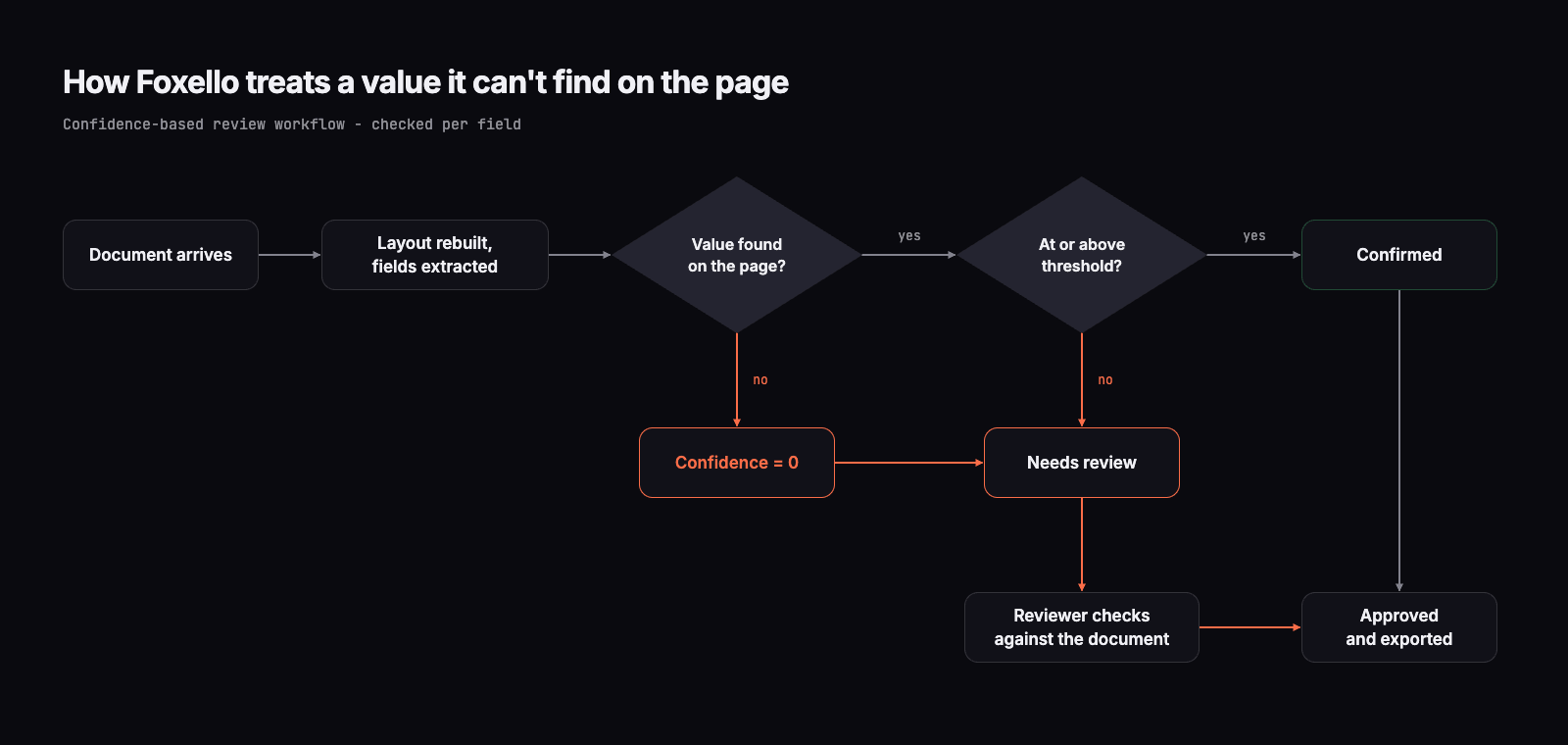
After extraction, Foxello traces each value back to where it actually appears on the page. If a value can't be found there, its confidence drops to zero. It doesn't matter how sure the model sounded. A PO number invented from nowhere has nowhere to point to, and that's exactly what gives it away.
Confidence is calculated per field, not as one score for the whole document. A coffee stain over the due date lowers the confidence of the due date, not the average of everything else. Poor scan quality pulls down the fields it affects, and only those fields.
What happens next
In a workflow with confidence-based review:
- Fields at or above your auto-confirm threshold are marked Confirmed. The default threshold is 90%, and you can set your own for the whole workflow.
- Fields below it, including anything that couldn't be traced to the page, go to Needs review in Review Hub.
- Your reviewer checks the flagged fields against the document. If a value is wrong, they select the correct text straight from the page, then approve and move to the next file.
Your team doesn't re-check the whole invoice. They check the two fields that need a human, and the rest goes straight through.
Two settings that make this work better
1. Mark as required only what must be there. A required field that comes back empty sends the whole document to review, which is what you want for a supplier name or a total. But if you mark the PO number as required and some suppliers never use POs, every one of their invoices will land in review. Make that field optional, and an empty PO number becomes an honest blank instead of a problem.
2. Describe fields precisely. Each field has a plain-language description, and the model uses it. "The purchase order number we issued, not the supplier's own order reference" leaves far less room for borrowing than just "PO number." If one field keeps getting flagged, sharpening its description is the fastest fix.
Less review over time
Review Hub isn't meant to be permanent overhead. As your team sees which document types come through clean, you can raise your confidence in the process: adjust the threshold, refine the field descriptions, and let more go straight through. The aim is for review to shrink to the cases that genuinely need a person.
How to test any tool for guessing
Demos use clean documents with every field present. Your inbox doesn't look like that. Before you trust any AI document processing tool with your invoices, test it on the cases where guessing happens.
This takes an afternoon and works on any tool, including ours.
1. Build a small test set from your own documents
Pick 15-20 real invoices. Include the awkward ones:
- suppliers who never put a PO number on their invoices
- invoices without payment terms, such as cash sales or prepaid orders
- a few poor scans or phone photos
- at least one two-column layout and one invoice with a table running across pages
Before you upload anything, write down the correct value for every field on every document. Where a field isn't on the page, write "blank." This answer key is the whole test.
2. Remove fields on purpose
Take two or three clean invoices, cover the due date or PO number, and scan them again. Now you know for certain the value isn't there.
A good tool returns a blank or flags the field. A tool that returns a value has just shown you how it behaves in production.
3. Check every filled value against the page
Don't just check whether values look right. For every non-empty field, find where it came from on the document. A value that matches nothing on the page, or matches the wrong label, is a guess, however tidy it looks.
4. Run the same documents twice
Upload the same set again a day later. A value that's genuinely on the page should come back the same both times. If a field changes between runs, the tool is filling it in rather than reading it.
5. Ask how confidence is calculated
Ask any vendor, us included, these questions:
- Is confidence given per field, or as one score for the document?
- Is it the model's own rating, or is it checked against something outside the model, such as whether the value appears on the page?
- When a value can't be found on the page, what happens to it?
- Can a reviewer see and select the source on the document when correcting it?
Vague answers to these questions are an answer in themselves.
6. Score it the way your AP team will feel it
A single accuracy percentage hides the important part. Score your results in three buckets instead:
| Result | How to weigh it |
|---|---|
| Correct value, or correct blank | Good |
| Blank or flagged where a value existed | Minor: costs a reviewer a minute |
| Invented or borrowed value, not flagged | Serious: this is the one that gets paid |
Also count how many documents came through with every field correct. A document with one wrong field still needs a human, so field-level accuracy always looks better than the workload you'll actually have.
A tool with slightly more blanks and zero unflagged guesses will cost you far less than one with impressive accuracy and the occasional silent invention.
People should check exceptions, not hunt for invisible errors
AI document processing was never meant to take people out of the process. The point is to stop them retyping what's already on the page, and to direct their attention to the few fields that genuinely need judgment.
A tool that guesses quietly gets this backwards. Your team either checks everything, which defeats the purpose, or checks nothing and finds the guesses weeks later in a reconciliation.
What to take away
- Flattening a page into plain text throws away the signal that a field is empty.
- Asking the model not to guess is a request, not a check.
- A single confidence score can hide the one field that's wrong.
- In accounting, a blank is cheap and an invented value is expensive.
- Test any tool on your own documents, with fields removed on purpose.
Try it on your own invoices
You can run the test from the previous section on Foxello. Create a workflow in about a minute, upload your most awkward invoices, and see which fields come back confirmed and which get flagged for review.
The free trial needs no card and includes enough tokens to run a first test. Documents are processed and stored in the EU, and we never train models on your documents.
Start free at foxello.com.