Most document projects start with a sentence like this: "We just need to extract data from PDF to Excel."
It sounds small. Then someone searches for document automation software and finds three very different answers, each sold as the obvious one.
Three answers to one question
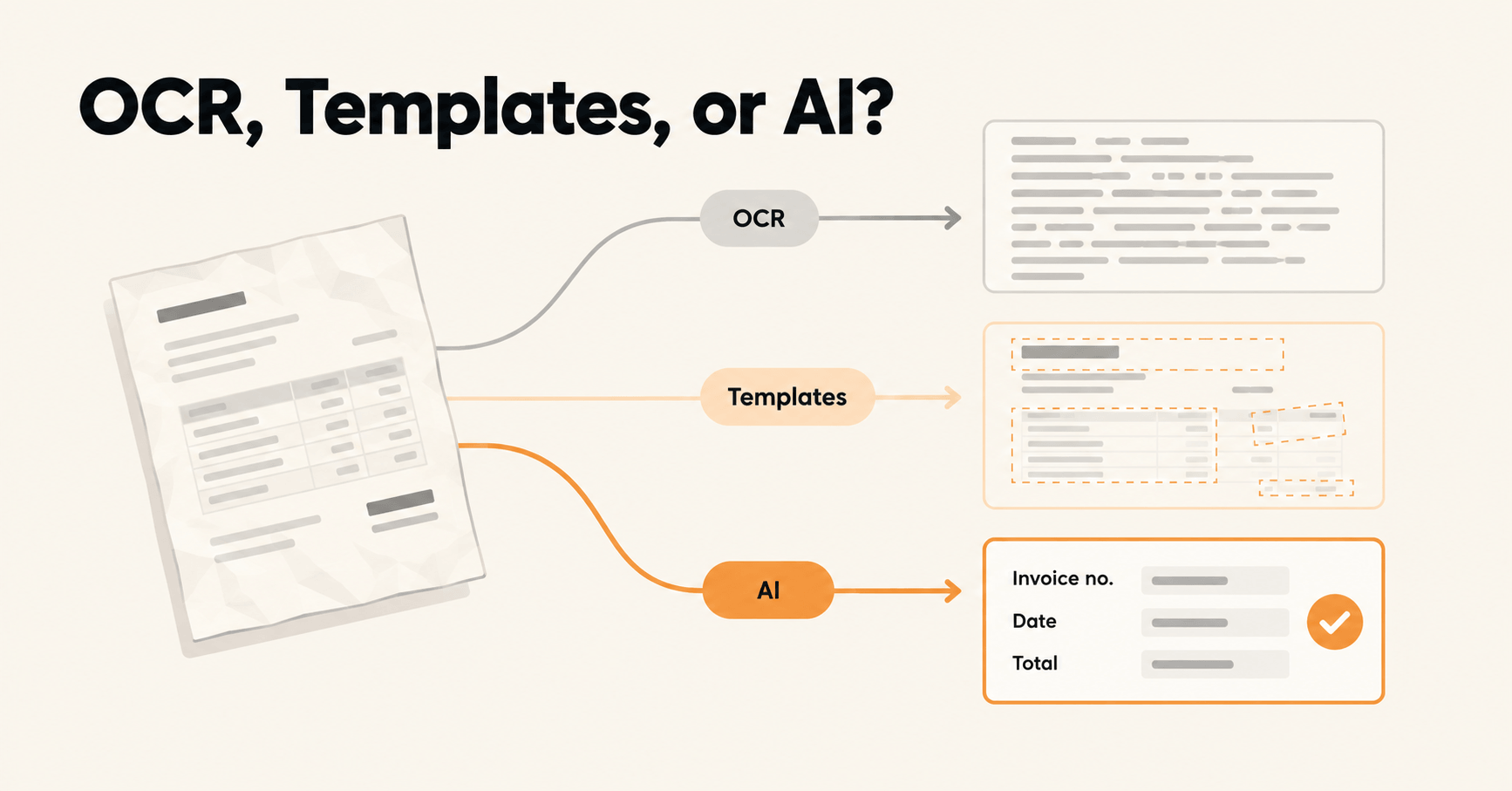
One camp says OCR. Another says templates. A third says AI will read anything you throw at it. OCR vs template vs AI extraction is the choice underneath almost every document project, even when nobody names it.
All three can be right. All three can also be an expensive mistake, depending on what your documents look like and who has to keep the setup running next year.
Why teams pick wrong
Most buying decisions happen in a demo. The demo uses a clean, digital invoice the tool has seen a hundred times. Everything works.
Your inbox is not a demo. It holds crooked phone photos, a supplier who redesigned their invoice last month, and a form someone filled in by hand with a pen that was running out of ink.
The real decision: who does the maintenance
So you're not really choosing a technology. You're choosing where the ongoing work lands.
With plain OCR, the work lands on whoever turns raw text into usable rows. With templates, it lands on whoever rebuilds a template every time a layout changes. With AI, it lands on whoever reviews the fields the system isn't sure about.
Some work always remains. The question is which kind your team can live with, at your volume, for the next two years.
What this guide gives you
You get five questions that point to the right approach and a simple decision map. You also get the hidden costs of each option, plus a way to test them on your own documents before you commit a single euro.
There are no product rankings here. The goal is enough clarity to walk into any demo and ask the questions that matter.
The three approaches in plain English
Before choosing, it helps to know what each approach actually does to a page. The differences are simpler than the marketing makes them sound.
Plain OCR: the page becomes text
OCR (optical character recognition) looks at an image of a page and turns the shapes into characters. That's the whole job.
You get text back, usually in reading order, sometimes not. What you don't get is meaning. OCR has no idea which number is the total and which one is the VAT.
That's why trying to extract data from PDF to Excel with OCR alone usually ends with someone copying values from a text file into a spreadsheet. The typing hasn't disappeared. It moved.
Before you pay for OCR: the cursor test
Open the PDF and try to highlight a line with your cursor. If it highlights, the file already has a text layer and needs no OCR at all.
Many PDFs exported from accounting or invoicing software pass this test. Scans and phone photos don't.
Templates: rules tied to positions on the page
With a template, someone draws boxes on a sample document: invoice number here, date there, total in the bottom right. The tool then reads those exact spots on every document that matches.
When layouts are stable, this is fast, cheap to run, and very predictable. Same input, same output, every time.
The catch is in the word "matches". A new supplier needs a new template, and a redesigned invoice needs a fixed one. The tool knows where to look, not what it's looking at.
AI extraction: describe the field, let the model read
With AI extraction, you describe the data you want in plain language, such as "invoice number", "due date", or "total including VAT". The model reads the document the way a person would, using labels, context, and layout to find each value wherever it sits.
A new layout doesn't need new setup. The trade-off is that the model makes a judgement call on every field, so you need a way to check the ones it's unsure about. More on that below.
The middle option you may hear about
Some tools use trained models. These learn a document type from a batch of labelled examples you provide, then cope with variations of it.
They sit between templates and AI extraction. They're more flexible than drawn boxes, but every new document type means another round of collecting and labelling samples.
Invoice extraction, three ways
Here's what each approach hands back from the same supplier invoice.
Plain OCR returns something like this:
NORDLICHT PACKAGING GmbH        INVOICE
Invoice No. INV-20431     Date 03.09.2026
Pallet wrap 500mm x 12    ...
Total EUR 1.284,60
The same invoice through all three approaches:
| Plain OCR | Template | AI extraction | |
|---|---|---|---|
| What you get | One block of text | Named fields, if the layout matches a template | Named fields |
| Invoice number | Somewhere in the text | INV-20431 | INV-20431 |
| Total | "EUR 1.284,60", buried in the text | 1284.60 | 1284.60 |
| Supplier redesigns next month | Still just text | Empty or wrong fields until someone fixes the template | Same fields, no new setup |
| Ready for Excel? | No, someone copies values over | Yes, for known layouts | Yes, with a check on uncertain fields |
None of this tells you which one to pick yet. That depends on your documents, and that's where the five questions come in.
The five questions that decide it
You don't need a feature matrix to choose. Five honest answers about your own documents will get you most of the way there.
1. Do you need searchable text, or specific fields?
Start with where the data ends up. If the goal is to archive scans and find them later by searching, text is enough. You don't need anything smarter.
If the data feeds an accounting system, an ERP, or a spreadsheet with named columns, you need fields. That means "invoice number" and "due date" as separate, clean values you can drop straight into a column.
Leans toward: OCR for search and archiving. Templates or AI for anything that feeds another system.
2. How many layouts arrive, and who controls them?
Start by counting distinct layouts. A thousand copies of your own internal form is one layout. Two hundred invoices from sixty suppliers is sixty.
Then ask who designed them. If it's your own form, you decide when it changes. If it's supplier invoices, they do, and they won't ask you first. Invoice extraction across a growing supplier list is where this question bites hardest.
Leans toward: templates for a few layouts you control. AI for many layouts someone else controls.
3. How often do those layouts change?
Some documents barely move. Official forms tend to change on a known schedule, usually with plenty of notice.
Supplier documents change whenever the supplier feels like it. They switch invoicing software, add a logo, or move the bank details to page two. Nobody sends you a heads-up.
Leans toward: templates if change is rare and predictable. AI if change is frequent or random.
4. What does a wrong value cost you?
A misread reference in an archive is an annoyance. A wrong total or IBAN on a payment run is a real problem.
Every approach can get a value wrong. So the useful question is how you'll know when it's wrong.
Leans toward: this one shapes your review process more than your choice of approach. If mistakes are expensive, plan a check on uncertain values whatever you pick.
5. Who will maintain it, and what can they do?
Every setup needs an owner, even after launch day. Be specific about who that person is and how much of their week you can spare.
Templates need someone comfortable adjusting configuration whenever a layout breaks. AI extraction needs someone who can write clear field descriptions in plain language and review flagged values. Plain OCR needs someone to key the data in downstream.
Leans toward: whichever approach matches the skills and hours your team has today.
Answer all five honestly and a pattern usually shows up. The next section turns those answers into a simple map.
The decision map
Here are the first four questions as one flow. Start at the top and follow your honest answers. The fifth, who maintains it, is your tiebreaker when two options look equal.
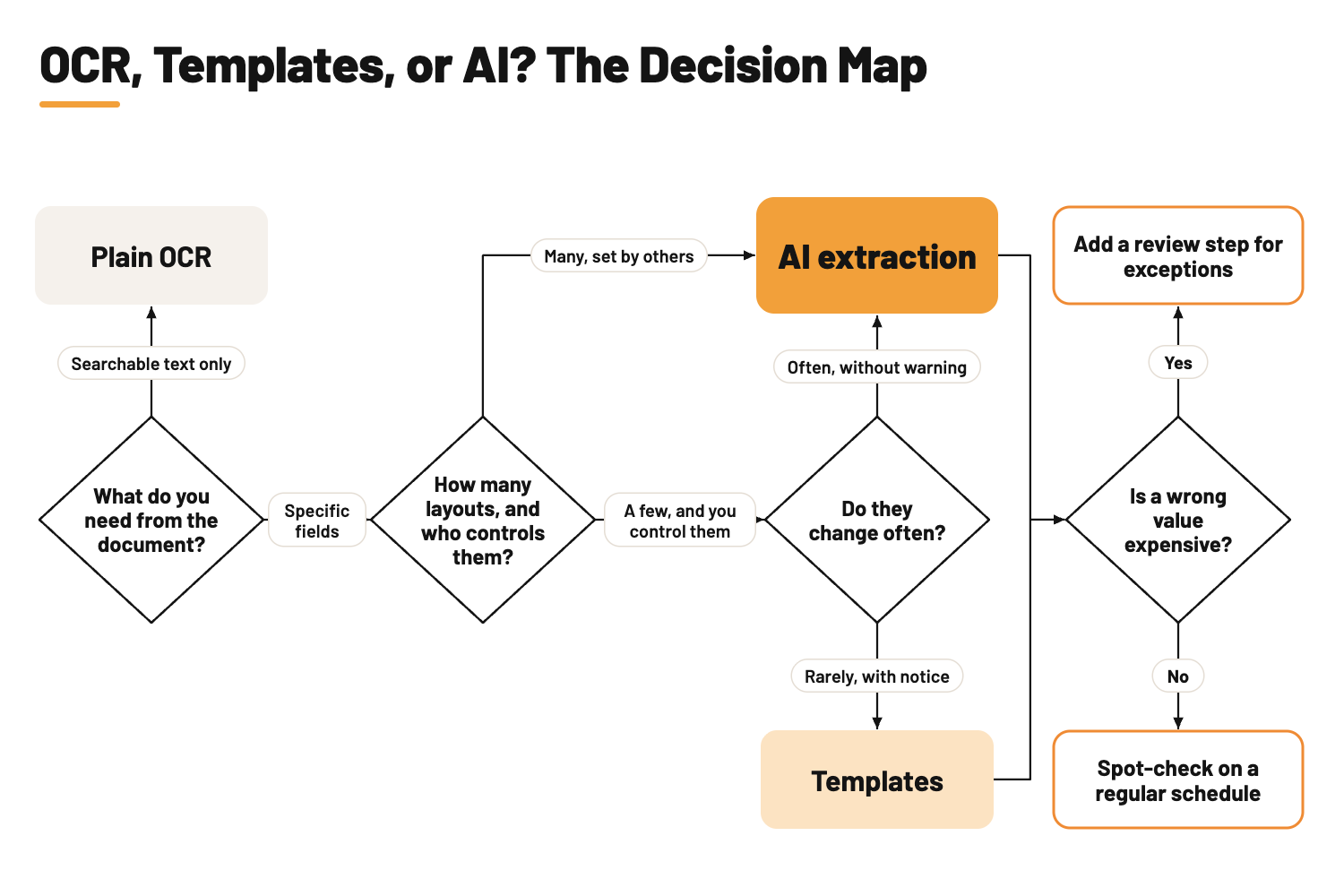
Maps are easier to trust with real situations on them. Here are some common ones.
| Situation | Best fit | Why |
|---|---|---|
| Scanned contracts you need to find later | Plain OCR | You search the text. Nobody needs the fields. |
| One internal expense form, unchanged for years | Templates | You own the layout, it rarely moves, and predictable output is a bonus. |
| Invoices from a supplier list that keeps growing | AI extraction | Every new supplier is a new layout you don't control. |
| Handwritten application or intake forms | AI extraction | Handwriting and inconsistent filling defeat fixed boxes. |
| A high-volume standard form with a fixed layout | Templates or a ready-made model | The layout barely moves, so setup pays off many times over. |
| Digital PDFs from accounting software, needed as Excel rows | AI extraction or templates, depending on layout count | The text is already there, as the cursor test shows. What you need are the fields. |
| A few known forms plus a long tail of one-off suppliers | A mix | Put the stable forms on rails and send the long tail to AI. |
If your situation lands on two rows at once, that's normal. Many teams end up with a mix, and we'll cover how to set that up properly.
The map shows where to start. It doesn't show what each option costs you six months in, which comes next.
Where each approach quietly costs you
No setup is free after launch. The pricing page shows what you pay to start, but it leaves out the work that turns up later.
Plain OCR: the typing moves downstream
OCR is cheap and fast, which is exactly why teams overestimate what it saves. The text comes out, and then someone still has to find the invoice number, copy the total, and fix "1.284,60" so the spreadsheet reads it as a number.
You haven't removed manual data entry. You've added a step in front of it.
Templates: upkeep that grows with every supplier
Templates feel finished the day they go live. Then a new supplier sends a first invoice, and the team has two choices: key it in by hand while someone builds a template, or leave it waiting.
Multiply that by every new supplier and every redesign, and the upkeep keeps growing. Somewhere along the way, a tool bought to remove manual work creates a new kind of it.
The silent failure problem
The worst template failures don't announce themselves. A supplier moves the date field, the template reads the wrong box, and plausible-looking values keep flowing into your system.
Often, nobody notices until exceptions pile up or a payment goes wrong. By then, bad data can have been sitting in the books for weeks.
The supplier side effect
Your suppliers notice too. An invoice stuck waiting for a template fix is an invoice paid late, and a supplier who gets paid late remembers it.
That's a relationship cost caused by a technical limitation. It never shows up in a software comparison.
AI extraction: flexible, but it needs guardrails
AI extraction removes the template problem, but it adds a different one. The model makes a judgement on every field, and without checks it can return a value that isn't actually on the page.
The fix is well understood, and you should expect it from any tool you evaluate:
- Check values against the source. Every extracted value should trace back to text that exists in the document.
- Add simple rules on top. For example, line items should add up to the total, and a due date shouldn't come before the invoice date.
- Review only what's uncertain. Low-confidence fields go to a person, and everything else flows through.
There's a skill cost as well. Vague field descriptions produce vague results, so someone has to write "total including VAT" rather than just "amount".
Signs you've outgrown your setup
Whatever you use today, these are the signals worth watching:
- Your team spends more time fixing templates than improving the process around them.
- New suppliers wait days before their invoices can be processed.
- The "automated" workflow still ends with someone retyping values into Excel.
- Errors get found at month-end close instead of at intake.
- Nobody trusts the output enough to stop double-checking all of it.
If two or more sound familiar, the approach is working against you, whatever it cost to set up.
Most teams end up hybrid, and how to run a fair pilot
Picking one approach for every document sounds tidy. In practice, many teams that run this well mix approaches, because their documents are mixed too.
What a sensible mix looks like
Think of it as sorting by how predictable each document stream is:
- Stable, high-volume forms go on rails. Use templates or a ready-made model for the standard layouts that barely change.
- The long tail goes to AI extraction. That covers one-off suppliers, new vendors, handwritten forms, and anything that turns up in a new layout.
- Simple rules run on everything. Totals should add up, dates should make sense, and required fields shouldn't be empty.
- People review exceptions only. Uncertain values and failed rules go to a person, and everything else flows straight through.
This setup doesn't aim for zero human involvement. It saves people for the calls that genuinely need their judgement.
How to run a pilot that tells you the truth
Plenty of pilots are rigged by accident. Someone picks twenty clean PDFs, the tool handles them beautifully, and the contract gets signed.
A fair pilot looks more like this:
- Use your real documents. Pull at least a few dozen straight from the inbox, including the crooked scans, the handwritten ones, and the supplier everyone complains about.
- Count corrections per field, not per document. "Most documents processed" hides a lot. "How many fields did we have to fix?" doesn't.
- Time a new layout. Add a supplier the tool has never seen, and measure how long it takes before that invoice comes out right.
- Run it next to your current process. Process the same documents both ways for a few weeks, compare results, and switch only when the new setup is clearly better.
- Test the whole path. Check that the data lands correctly in your spreadsheet or accounting system.
- Price the review time. The cost per document isn't only the software. Add the minutes your team spends checking flagged values.
A simple pilot scorecard
| What to measure | How to measure it | What good looks like |
|---|---|---|
| Field accuracy | Fields corrected divided by fields extracted | Corrections are rare and concentrated on genuinely hard documents |
| New layout onboarding | Time from first unseen document to correct output | Measured in minutes |
| Review load | Share of documents that need a person | Shrinks as you tune field descriptions and rules |
| End-to-end fit | Data arriving in the real destination system | No manual reformatting before import |
| True cost | Software plus review time, per document | Clearly below what manual entry costs you today |
Give the pilot a few weeks. Layout changes and odd documents only show up with time, and those are exactly the cases you're testing for.
How we approach it at Foxello
We built Foxello for teams that live in the "many layouts, someone else controls them" corner of the map. Most small teams live there too, whether they've counted their layouts or not.
No templates to build
You create a workflow in about a minute, then describe the fields you want in plain language. "Invoice number", "due date", and "total including VAT" are all the setup there is.
For documents that need more consistency, you can guide the model with a single example. For common document types such as invoices, ready-made models skip the setup entirely.
Every value is checked against the page
This is our answer to the biggest worry about AI extraction. Each field gets its own confidence score, and a value that can't be traced back to the text on the document gets zero confidence.
Zero confidence means it goes to review instead of your books. You set the confidence threshold for automatic approval, and you can mark fields as required so a missing value sends the document to review instead of your books.
Built for real inboxes
Scans, phone photos, and handwritten forms go through the same workflow as clean PDFs. Documents can arrive by upload, email, cloud folders, or FTP. Results go out as Excel, CSV, or JSON, or straight into your tools through Zapier, n8n, or webhooks.
Foxello is EU-hosted, so your documents stay in the EU. We never train models on them or use them for anything beyond processing.
Try it on your ugly documents
You can start free, with no credit card. Bring the pilot from the previous section: your real documents, including the ones everyone complains about. That's the fairest test we know.
Wrap-up: your one-screen checklist
Choosing an extraction approach comes down to where the ongoing work lands, and whether your team can carry it.
Answer these five first
- Do we need searchable text, or specific fields for another system?
- How many distinct layouts arrive, and who controls them?
- How often do they change, and do we get any warning?
- What does a wrong value cost us?
- Who maintains the setup, and what can they realistically take on?
Then run a fair pilot
- Use real documents, the ugly ones included.
- Count corrections per field, not per document.
- Time how long one new, unseen layout takes to come out right.
- Run in parallel with your current process for a few weeks.
- Check the data in the real destination system.
- Include review time in the cost.
The short version
If you only need to search scanned documents, OCR is enough. If your documents come from a handful of stable layouts you own, templates will serve you well for years.
If you're doing invoice extraction across a supplier list that keeps growing, or dealing with handwriting and messy scans, AI extraction with a review step is the approach that scales without adding headcount.
Whatever you pick, pick it with your worst documents on the table, not your best.